Train a tool-using Math Agent (ReAct + Python executor) to solve GSM8K-style math problems. Rewards come from a judge that checks final-answer correctness.
Overview
In Math Agent, each training sample is a math word problem (e.g., GSM8K). The agent learns to reason step by step (ReAct-style), call a Python tool when computation is needed, and produce a final answer that matches the reference.
This tutorial is organized in two steps:
- Run it: Download the dataset and start training with the default YAML config
- Understand & customize: Read the workflow and the judge/reward logic
Quick Start
Prepare Dataset
Download the openai/gsm8k dataset:
Start Training
# (optional) recommended cleanup before training
# ajet --kill="python|ray|vllm"

ajet --conf tutorial/example_math_agent/math_agent.yaml --backbone='verl'
Quick Debugging (Optional)
If you want to breakpoint-debug the workflow/judge locally:
# (optional) recommended cleanup before debug
# ajet --kill="python|ray"

clear && \
ajet --conf tutorial/example_math_agent/math_agent.yaml --backbone='debug' --with-logview
When --backbone=debug, Ray is disabled. You can use a VSCode launch config:
Understanding the Training Pipeline
What Happens Each Step
- Load one problem Load a math problem from the dataset via `task_reader`.
- Run the AgentScope workflow Build the prompt, let the ReAct agent call Python tools, and extract the final answer.
- Register info for evaluation Return `WorkflowOutput(reward=None, metadata={"final_answer": final_answer})`.
- Run the judge Compare `final_answer` with reference, compute `raw_reward` and `is_success`.
YAML Configuration
Most wiring happens in tutorial/example_math_agent/math_agent.yaml:
ajet:
  task_reader:
    type: huggingface_dat_repo   # also supports: dataset_file / env_service

  rollout:
    user_workflow: tutorial.example_math_agent.math_agent->ExampleMathLearn

  task_judge:
    judge_protocol: tutorial.example_math_agent.math_answer_as_judge->MathAnswerAndLlmAsJudge

  model:
    path: YOUR_MODEL_PATH
| Field | Description |
|---|---|
task_reader |
Where tasks come from |
user_workflow |
Which workflow runs per sample |
judge_protocol |
Which judge computes rewards |
model.path |
Pretrained model to fine-tune |
Code Walkthrough
Workflow: tutorial/example_math_agent/math_agent.py
self.toolkit = Toolkit()
self.toolkit.register_tool_function(execute_python_code)

self.agent = ReActAgent(
    name="math_react_agent",
    sys_prompt=system_prompt,
    model=tuner.as_agentscope_model(),  # trainer-managed model wrapper
    formatter=DashScopeChatFormatter(),
    toolkit=self.toolkit,
    memory=InMemoryMemory(),
)

msg = Msg("user", init_messages[0]["content"], role="user")
result = await self.agent.reply(msg)
final_answer = extract_final_answer(result)

# IMPORTANT: provide final answer to the judge via WorkflowOutput metadata
return WorkflowOutput(reward=None, metadata={"final_answer": final_answer})
Important
Always provide the final answer via WorkflowOutput.metadata so the judge can score it.
Reward Computation
The judge receives:
| Object | Contains |
|---|---|
workflow_task |
Task info; reference answer from metadata |
workflow_output |
Workflow result; final answer from metadata["final_answer"] |
Extending the Judge
If you observe issues like "almost solved but messed up tool-call formatting", you can extend the judge to add:
- Format penalty (invalid
<tool_call>) - Behavior penalty (tool called but no
print) - Keep answer correctness as the primary signal
Results
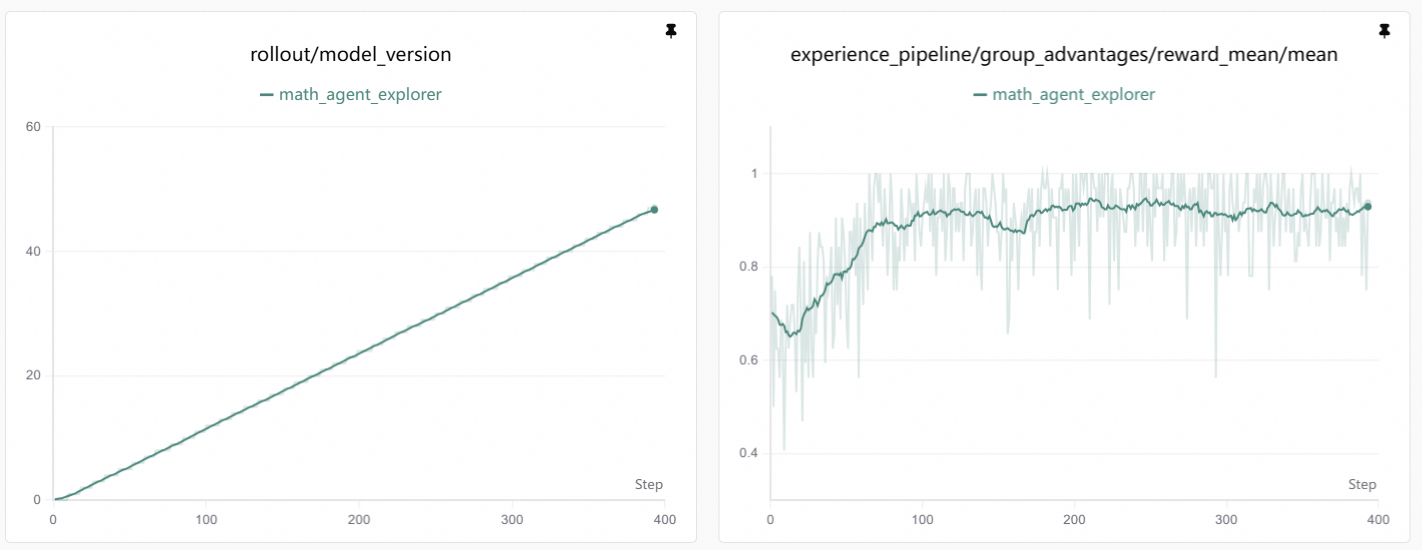
Training Curve
Visualization
Training curves are generated by SwanLab. See Visualization Tools for setup.
Interpretation: As training progresses, reward increases. This usually means the agent becomes more stable at:
- Using tools when needed: Correctly emitting
<tool_call>and callingexecute_python_code - Producing reliable answers: Using tool output to produce final answers aligned with reference
Case Study: Tool Discipline Improvement
Before training, the agent may solve many problems but often fails at tool-call discipline:
# bad case 1: forgot to print the result in python code
<tool_call>
{"name": "execute_python_code", "arguments": {"code": "... height_difference"}}
</tool_call>

# bad case 2: too impatient — outputs final answer without waiting for tool result
<tool_call> {"name": "execute_python_code", ...} </tool_call>
<tool_call> {"name": "generate_response", "arguments": {"response": "... \\boxed{48} ..."}} </tool_call>
These failures are not because the model "can't do math", but because it does not close the loop by incorporating the tool execution result.
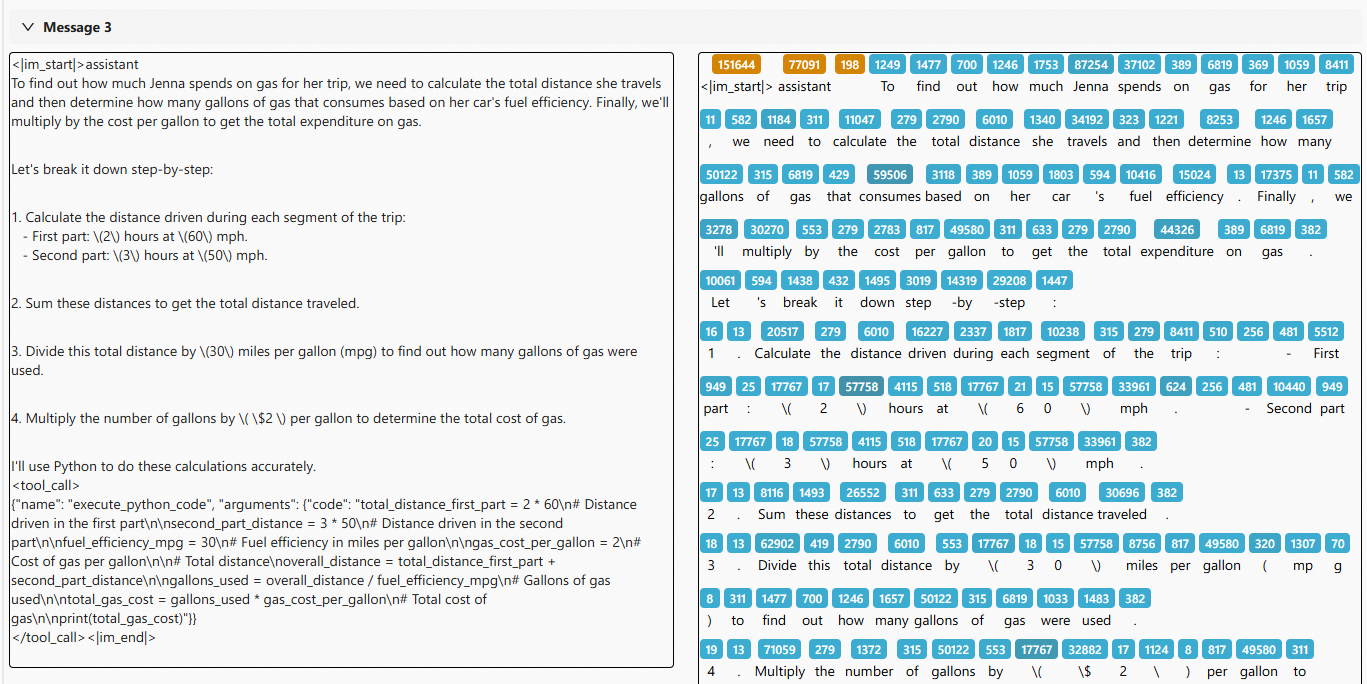
After tuning, the agent follows a clean 3-stage pattern:
- Message 3 (assistant): Decomposes problem + emits
<tool_call>withprint(...) - Message 4 (tool_response): Tool returns execution results
- Message 5 (assistant): Reads
stdoutand produces final answer
Token-level Visualization
The colored blocks show token-level sequence visualization from Beast-Logger:
- Yellow tokens: Excluded from loss computation
- Blue tokens: Participate in loss computation (light to dark = high to low logprob)


