1. Overview
Frozen Lake is a classic reinforcement learning task from Gymnasium.
In this environment, the agent is placed on a randomly generated frozen lake, which consists of safe ice ( _ ), dangerous holes (O), and a goal (G). The agent's position is marked as P. The goal is to navigate from the starting position P to the goal G while avoiding the holes. The agent can move up, down, left, or right, but due to the slippery nature of the ice, there is a probability of moving in an unintended direction.
This example demonstrates how to create a trainable agent workflow to solve this navigation challenge.
2. Quick Start
2.1 Preparation
Install the dependencies required for the Frozen Lake:
2.2 Start Training
Use the provided configuration file to quickly start training:
To try a harder setting:
Quick Debugging (Optional)
If you want to breakpoint-debug the workflow/judge locally: When `--backbone=debug`, Ray is disabled. You can use a VSCode `.vscode/launch.json` like below:3. Understand
3.1 Core Process
This example packages a multi-step environment interaction loop into a trainable Workflow:
- The workflow resets the environment and renders the current grid as a text observation for the agent.
- The agent reads the observation and outputs one of
Up | Down | Left | Right. - The environment executes the action, returns the next observation and reward.
- The loop stops on success or when the max step limit is reached.
3.2 Configuration Details
The key fields in tutorial/example_frozenlake/frozenlake_easy.yaml / frozenlake_hard.yaml are:
ajet.rollout.user_workflow: entry point of the workflow class, set totutorial.example_frozenlake.frozenlake->FrozenLakeWorkflow.ajet.rollout.multi_turn.max_steps: maximum steps per episode (also used by the agent).frozen_lake.frozen_lake_size: grid size (e.g. 4 for easy, 6 for hard).frozen_lake.is_slippery: whether the action may slip to unintended directions.
3.3 Code Map
The FrozenLakeEnv class in tutorial/example_frozenlake/frozenlake.py wraps the Gymnasium Frozen Lake environment, mainly exposing the step and reset methods.
-
The
stepmethod returns the next state (observation), reward, done flag, and additional info based on the agent's action.- observation: The state of the lake after the agent moves, represented as a string, e.g.:
- reward: The reward received after each move. The agent receives 1 for reaching the goal G, otherwise 0.
- done: Boolean value. True if the agent reaches the goal or falls into a hole, otherwise False.
- info: Additional information.
-
The
resetmethod regenerates the lake environment based on user parameters.
The FrozenLakeAgent class in tutorial/example_frozenlake/frozenlake.py implements the agent's decision logic, mainly through the step method, which takes the current environment observation as input and returns the chosen action. The core is a ReActAgent.
class FrozenLakeAgent:

    def __init__(self, model: ModelTuner, max_steps: int = 20):
        self.agent = ReActAgent(
            name="frozenlake_agent",
            sys_prompt=SYSTEM_PROMPT,
            model=model,
            formatter=DashScopeChatFormatter(),
            max_iters=2,
        )
        # other initialization code

    async def step(self, current_observation: str) -> str:
        # Step 1: Build user prompt based on current_observation
        # Step 2: Call ReActAgent to get raw response
        # Step 3: Parse response and return action
The FrozenLakeWorkflow class in tutorial/example_frozenlake/frozenlake.py integrates the environment and agent, mainly exposing the execute method.
class FrozenLakeWorkflow(Workflow):

    async def execute(self, workflow_task: WorkflowTask, tuner: AjetTuner) -> WorkflowOutput:
        # init agent and env
        # reset environment and get initial `observation_str`
        rewards = []
        for _ in range(self.max_steps):
            action = await self.agent.step(observation_str)
            observation_str, reward, done, info = self.env.step(action)
            rewards.append(reward)
            if done:
                break
        return WorkflowOutput(
            reward=sum(rewards),
        )
3.4 Reward
- The per-episode reward is the sum of step rewards.
- In this FrozenLake setup, the agent gets
+1when reaching the goal, otherwise0. - The workflow also returns metadata such as
terminate_reason(success,agent_error,max_steps_reached) andstep_count.
4. Results
4.1 Training Curve
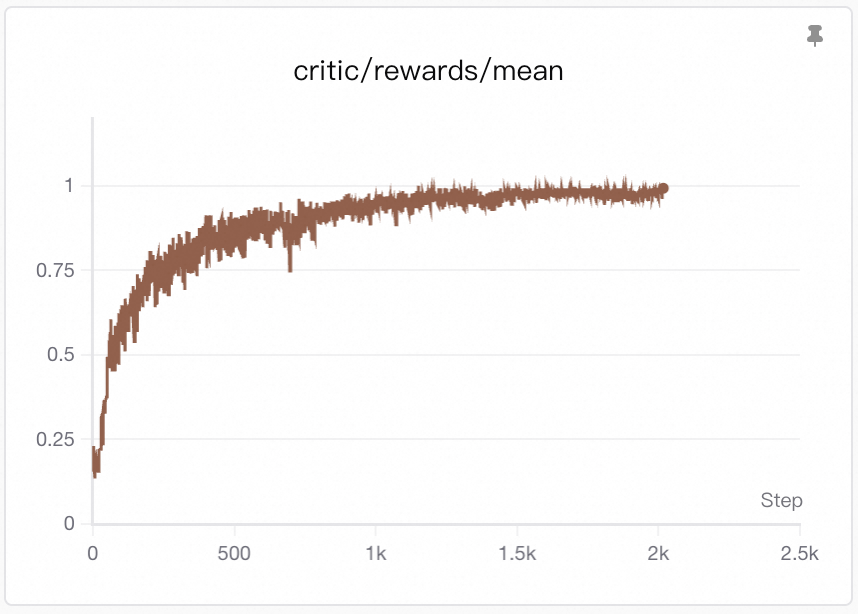
Visualization: Training curves are generated by SwanLab. See Visualization Tools for setup and usage.
Since the reward is sparse (only +1 when reaching the goal, otherwise 0), the rising reward curve directly reflects an increasing success rate—the agent reaches the goal G more often.
This improvement typically comes from two aspects:
- Better spatial reasoning: the agent learns to parse the grid and identify the relative positions.
- Safer path planning: it avoids falling into holes and takes more reliable routes toward the goal.