This tutorial demonstrates how to train an agent to interact with AppWorld and solve complex tasks through tool usage.
1. Overview
AppWorld is a high-fidelity execution environment of 9 day-to-day apps, operable via 457 APIs, populated with digital activities of 106 people living in a simulated world. The goal is to tune an agent that can effectively navigate and utilize these apps to complete complex tasks.
This document is organized as follows:
- Quick Start: run the example with minimal setup
- Understand: workflow loop, configuration, code locations, and reward
- Results: training curve and qualitative cases
2. Quick Start
2.1 Preparation
First, download and unpack the Appworld services. The script below is idempotent: it clears any existing folder and re-downloads the archive.
base_path="/tmp"
export APPWORLD_PATH="${base_path}/pack_all_in_one"
export APPWORLD_SCRIPT="bash EnvService/env_sandbox/appworld.sh"

rm -rf "${APPWORLD_PATH}"
rm -f ./appworld_pack_v2.tar.gz

wget -q "https://dail-wlcb.oss-cn-wulanchabu.aliyuncs.com/astuner_archive/appworld_pack_v2.tar.gz" -O appworld_pack_v2.tar.gz
tar -xzf ./appworld_pack_v2.tar.gz -C "${base_path}"
Then export the environment variables (re-run in every new shell):
export BASE_PATH=/tmp
export APPWORLD_PATH="${BASE_PATH}/pack_all_in_one"
export APPWORLD_SCRIPT="bash EnvService/env_sandbox/appworld.sh"
2.2 Start Training
Run the training script:
Quick Debugging (Optional)
If you want to breakpoint-debug the workflow/judge locally: When `--backbone=debug`, Ray is disabled. You can use a VSCode `.vscode/launch.json` like below:3. Understand
This section explains how the AppWorld example is assembled: workflow, reward, configuration, and code locations.
3.1 Core Process
The AgentScope workflow code for the AppWorld example is located at tutorial/example_appworld/appworld.py.
The code first defines the AgentScope workflow (set the agent's model to tuner.as_agentscope_model()):
agent = ReActAgent(
    name="Qwen",
    sys_prompt=first_msg["content"],
    model=tuner.as_agentscope_model(),
    formatter=DashScopeChatFormatter(),
    memory=InMemoryMemory(),
    toolkit=None,
    print_hint_msg=False,
)

env = workflow_task.gym_env

for step in range(tuner.config.ajet.rollout.multi_turn.max_steps):
    # agentscope deal with interaction message
    reply_message = await agent(interaction_message)
    # env service protocol
    obs, _, terminate, _ = env.step(
        action={"content": reply_message.content, "role": "assistant"}
    )
    # generate new message from env output
    interaction_message = Msg(name="env", content=obs, role="user")
    # is terminated?
    if terminate:
        break
    if tuner.get_context_tracker().context_overflow:
        break
In the above code:
env.step: simulates the gym interface. It takes an action as input and returns a four-tuple(observation, reward, terminate_flag, info).tuner.get_context_tracker().context_overflow: checks whether the current context window has exceeded the token limit.
3.2 Reward
In ajet/task_judge/env_service_as_judge.py, we read the reward signal from the environment via env.evaluate(...).
You can also refer to this file to implement your own Judge for your specific task.
3.3 Configuration Details
Copy and modify the key parameters in tutorial/example_appworld/appworld.yaml. The parts most relevant to this document are marked with  in the yaml file:
- Read tasks (corresponding config field:
ajet.task_reader) - Define the workflow (corresponding config field:
ajet.rollout.user_workflow)- Example: if the AgentScope workflow is defined in the
ExampleAgentScopeWorkflowclass intutorial/example_appworld/appworld.py - Then set
ajet.rollout.user_workflow = "tutorial.example_appworld.appworld->ExampleAgentScopeWorkflow"
- Example: if the AgentScope workflow is defined in the
- Define the scoring function (corresponding config field:
ajet.task_judge.judge_protocol)- Example:
ajet.task_judge.judge_protocol = "ajet.task_judge.env_service_as_judge->EnvServiceJudge"
- Example:
- Specify the model (corresponding config field:
ajet.model.path)
ajet:
  project_name: example_appworld
  experiment_name: "read_yaml_name"
  task_judge:
    # [key] Implement and select the evaluation function
    judge_protocol: ajet.task_judge.env_service_as_judge->EnvServiceJudge
  model:
    # [key] Set the model to be trained
    path: YOUR_MODEL_PATH
  rollout:
    # [key] Implement and select the Agent
    user_workflow: tutorial.example_appworld.appworld->ExampleAgentScopeWorkflow
    force_disable_toolcalls: True
  debug:
    debug_max_parallel: 1
    debug_first_n_tasks: 1
4. Results
4.1 Training Curve
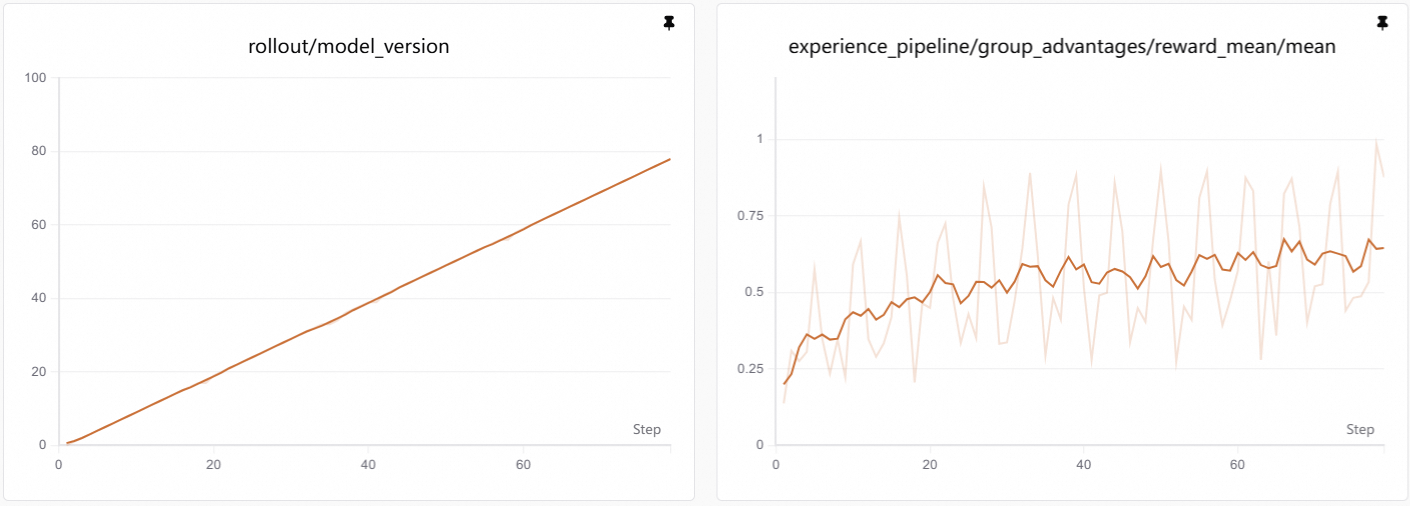
Visualization: Training curves are generated by SwanLab. See Visualization Tools for setup and usage.
As training progresses, reward increases. This usually means the agent becomes more stable on two things:
- Following correct API protocols: it learns to look up API documentation before calling, and uses valid API endpoints instead of hallucinating non-existent ones.
- Completing multi-step workflows: it can properly obtain access tokens and chain multiple API calls to accomplish complex tasks.
4.2 Case Study
Before tuning:
- Frequently call non-existent APIs
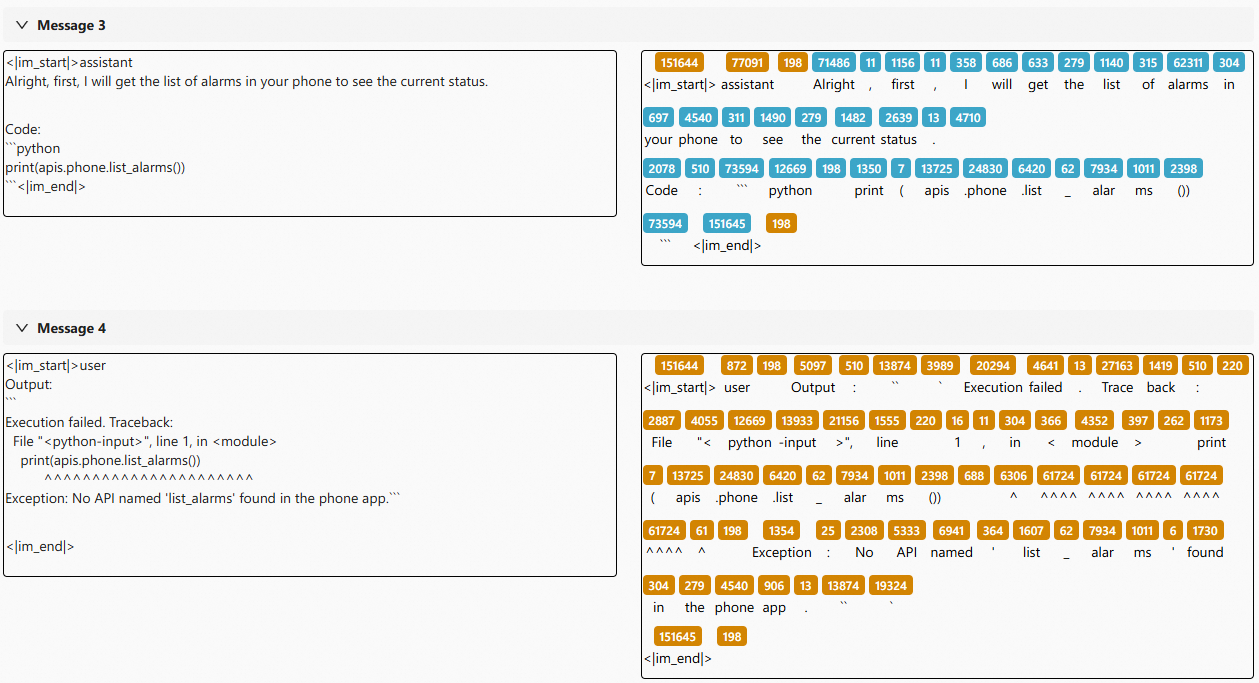
The agent hallucinates API names without checking whether they exist, leading to repeated failures.
- Fail to follow the instructions to obtain an access token
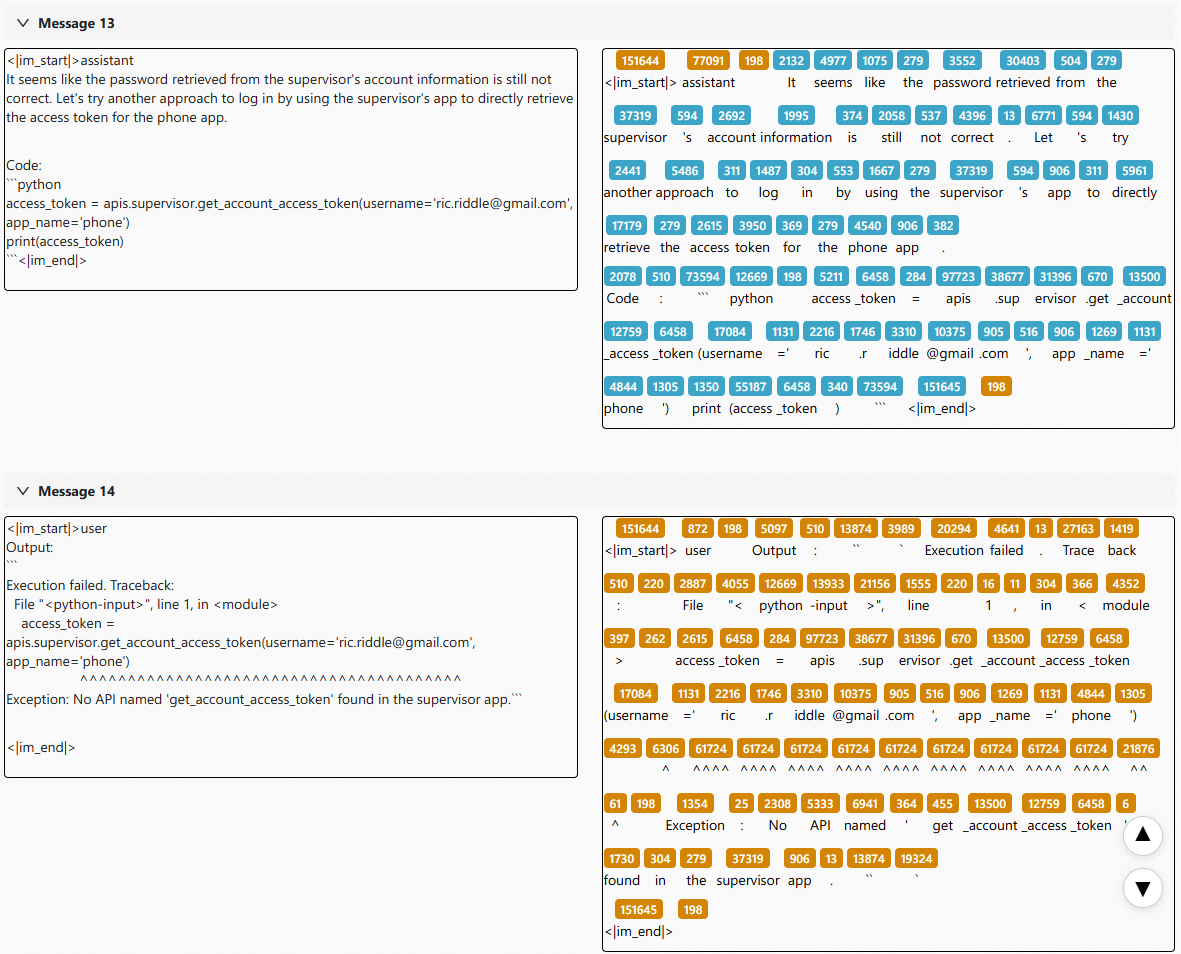
The agent attempts to call protected APIs without first obtaining the required access token, resulting in authentication errors.
After tuning:
- Look up the API documentation first, and learn to use valid APIs
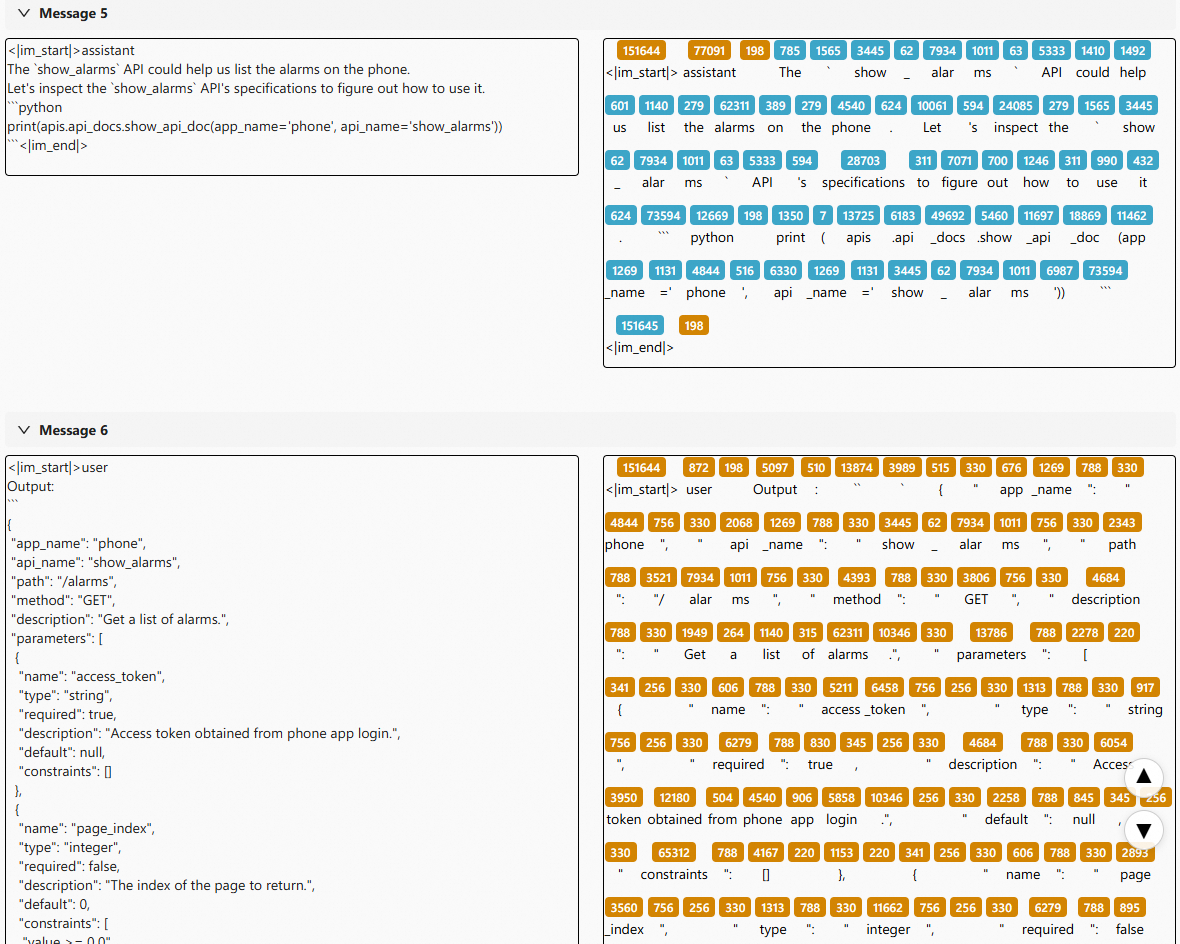
The agent now checks available APIs before making calls, avoiding hallucinated endpoints.
- Learn to obtain an access token correctly
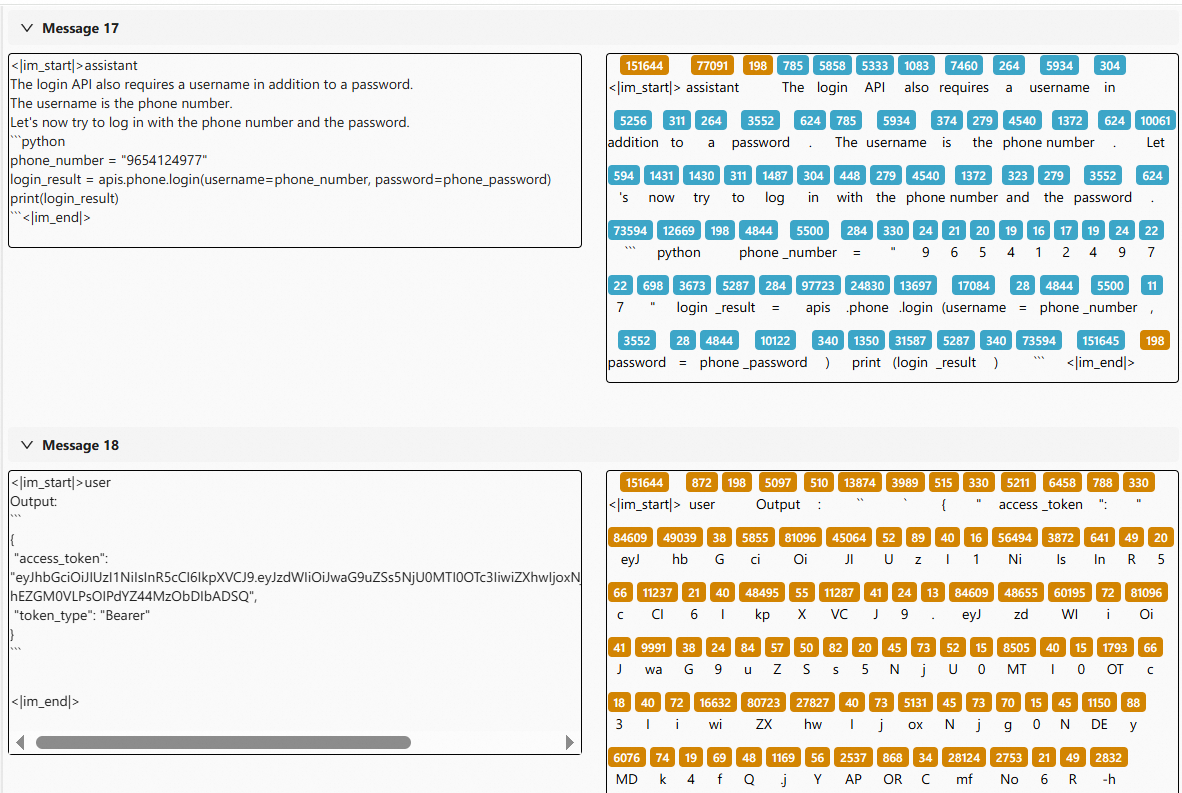
The agent properly handles the authentication step before accessing protected APIs.
Token-level Visualization: These detailed logs are generated by Beast-Logger. See Beast-Logger Usage for more details.